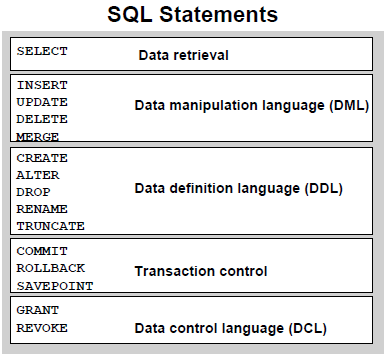
Showing posts with label SQL. Show all posts

SQL Joins

SQL Joins

The SQL Joins clause is used to combine records from two or more tables in a database. A JOIN is a means for combining fields from two tables by using values common to each.
There are different types of joins available in SQL:


  • INNER JOIN: returns rows when there is a match in both tables.
  • LEFT JOIN: returns all rows from the left table, even if there are no matches in the right table.
  • RIGHT JOIN: returns all rows from the right table, even if there are no matches in the left table.
  • FULL JOIN: returns rows when there is a match in one of the tables.
  • SELF JOIN: is used to join a table to itself as if the table were two tables, temporarily renaming at least one table in the SQL statement.


To use JOIN in a query statement, the query writer must know the structure of the tables. There must be at least one column of data between the two tables which matches for a JOIN to work properly. This information must be provided to the SQL server as part of the query.

Generally, the data involved in a JOIN operation is composed of a “primary” key value in one table and a “foreign” key value in another. A primary key is usually a unique identity value in a table. A foreign key exists in a table which is in some way related to the unique record in the table holding the primary key.

Left JOIN and Right JOIN
There are multiple types of JOIN statements. Each has a slightly different function. JOIN commands refer to the order in which the data is merged together. One of the most common JOIN statements is a LEFT JOIN. In a LEFT JOIN, all data from the table with the primary key value are returned as well as rows from the table holding the foreign key if there is a match. Rows in the foreign key table that do not match a value in the primary key table are ignored.

A RIGHT JOIN is very similar to a LEFT JOIN. As the name suggests, this JOIN type returns the exact opposite result of a LEFT JOIN. The RIGHT JOIN will return all rows from the table holding the foreign key in addition to rows from the primary key table that match. Rows from the primary key table that do not have a corresponding foreign key value are ignored.

Inner, Full, and Cross JOIN
An INNER JOIN statement will compare the data in both tables and return only those rows from each table where a match has occurred. Rows in both the primary key table and foreign key table that do not have a corresponding row in the other table will be ignored. A FULL JOIN is the opposite of an INNER JOIN. A JOIN of this variety returns all rows from each table, aligning data when a match exists.

Another variety of JOIN types, though used less commonly, is the CROSS JOIN. A CROSS JOIN ignores the key values provided and JOINS every row of the primary table with every row of the secondary table. This produces a Cartesian result set. This type of JOIN could be useful for viewing all possible combinations of cars and car paint colors, as an example.


Examples

SELECT e.last_name, e.first_name, e.salary,d.department_id

FROM employees e, departments d
where e.department_id = d.department_id


SELECT e.last_name, e.salary, j.grade_level
FROM employees e, job_grades j
WHERE e.salary BETWEEN j.lowest_sal AND j.highest_sal;


SELECT e.last_name, e.first_name, e.salary,d.department_id
FROM employees e full outer join departments d
on e.department_id = d.department_id

SELECT e.last_name, e.first_name, e.salary,d.department_id
FROM employees e , departments d
where e.department_id(+) = d.department_id

SELECT e.last_name, e.department_id, d.department_name
FROM employees e LEFT OUTER JOIN departments d
ON (e.department_id = d.department_id);

SELECT e.last_name, e.department_id, d.department_name
FROM employees e
RIGHT OUTER JOIN departments d
ON (e.department_id = d.department_id);

SELECT e.last_name, e.department_id, d.department_name
FROM employees e
FULL OUTER JOIN departments d
ON (e.department_id = d.department_id);

Self Joins e.g

SELECT worker.last_name || ' works for '
|| manager.last_name
FROM employees worker, employees manager

WHERE worker.manager_id = manager.employee_id;

What is SQL?

What is SQL?


  • SQL stands for Structured Query Language
  • SQL lets you access and manipulate databases
  • SQL is an ANSI (American National Standards Institute) standard


SQL (pronounced "ess-que-el") stands for Structured Query Language. SQL is used to communicate with a database. According to ANSI (American National Standards Institute), it is the standard language for relational database management systems. SQL statements are used to perform tasks such as update data on a database, or retrieve data from a database.

RDBMS

RDBMS stands for Relational Database Management System.

RDBMS is the basis for SQL, and for all modern database systems such as MS SQL Server, IBM DB2, Oracle, MySQL, and Microsoft Access.

The data in RDBMS is stored in database objects called tables.

A table is a collection of related data entries and it consists of columns and rows.


Writing SQL Statements

Using the following simple rules and guidelines, you can construct valid statements that are both easy to read and easy to edit:
• SQL statements are not case sensitive, unless indicated.
• SQL statements can be entered on one or many lines.
• Keywords cannot be split across lines or abbreviated.
• Clauses are usually placed on separate lines for readability and ease of editing.
• Indents should be used to make code more readable.
• Keywords typically are entered in uppercase; all other words, such as table names and columns, are entered in lowercase.

Executing SQL Statements

Using iSQL*Plus, click the Execute button to run the command or commands in the editing window.


What is an Operator in SQL?

What is an Operator in SQL?

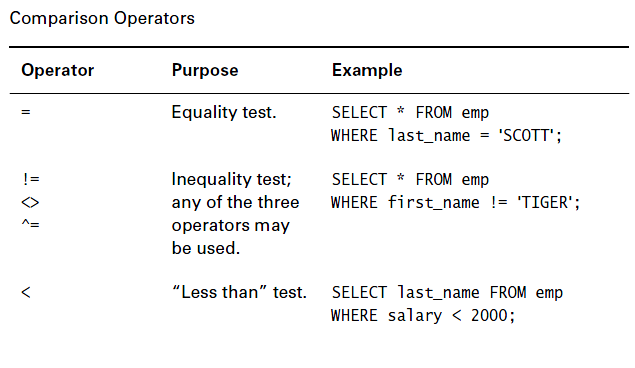
An operator is a symbol specifying an action that is performed on one or more expressions. The following tables lists the operator categories that SQL Server uses.

Arithmetic operators

Comparison operators

Logical operators

Set Operators


Operator Precedence (  *    /    +   - )
Unary Operator A unary operator has only one operand. +2 and –5 are examples.
They have the format <operator operand>.
Binary Operator Binary operators have two operands. 5 + 4 and 7 x 5 are examples.

They have the format <operand1 operator operand2>.


Types of SQL Functions

Types of SQL Functions

There are two distinct types of functions:
  1. Single-row functions
  2. Multiple-row functions

Single-Row Functions

These functions operate on single rows only and return one result per row. There are different types of single-row functions. This lesson covers the following ones:

  • Character
  • Number
  • Date
  • Conversion

Multiple-Row Functions

Functions can manipulate groups of rows to give one result per group of rows. These functions are known as group functions. This is covered in a later lesson.

Single-Row Functions (continued)

This lesson covers the following single-row functions:
  • Character functionsAccept character input and can return both character and number values
  • Number functionsAccept numeric input and returns numeric values
  • Date functionsOperate on values of the DATE data type (All date functions return a value of DATE data type except the MONTHS_BETWEEN function, which returns a number.)
  • Conversion functionsConvert a value from one data type to another
  • General functions:
– NVL
– NVL2
– NULLIF
– COALSECE
– CASE
– DECODE


1. Character Functions


SELECT 'The job id for '||UPPER(last_name)||' is '
||LOWER(job_id) AS "EMPLOYEE DETAILS"
FROM employees;

SELECT employee_id, last_name, department_id
FROM employees
WHERE last_name = 'higgins';
                                              no rows selected
SELECT employee_id, last_name, department_id
FROM employees
WHERE LOWER(last_name) = 'higgins';

SELECT employee_id, UPPER(last_name), department_id
FROM employees
WHERE INITCAP(last_name) = 'Higgins';


Character-Manipulation Functions

SELECT employee_id, CONCAT(first_name, last_name) NAME, job_id,
LENGTH (last_name), INSTR(last_name, 'a') "Contains 'a'?"
FROM employees
WHERE SUBSTR(job_id, 4) = 'REP';


2 - Number Functions

• ROUND: Rounds value to specified decimal
   ROUND(45.926, 2) ----->  45.93
• TRUNC: Truncates value to specified decimal
  TRUNC(45.926, 2)----->  45.92
• MOD: Returns remainder of division
  MOD(1600, 300) ----->  100

SELECT ROUND(45.923,2), ROUND(45.923,0),
ROUND(45.923,-1)
FROM DUAL;

SELECT last_name, salary, MOD(salary, 5000)
FROM employees
WHERE job_id = 'SA_REP';

3 - Working with Dates

• MONTHS_BETWEEN ('01-SEP-95','11-JAN-94')                       19.6774194 
• ADD_MONTHS ('11-JAN-94',6)                    '11-JUL-94'      
• NEXT_DAY ('01-SEP-95','FRIDAY')                             '08-SEP-95'
• LAST_DAY('01-FEB-95')                                      '28-FEB-95'

SELECT SYSDATE
FROM DUAL;


SELECT last_name, (SYSDATE-hire_date)/7 AS WEEKS
FROM employees
WHERE department_id = 90;


SELECT employee_id, hire_date,
ROUND(hire_date, 'MONTH'), TRUNC(hire_date, 'MONTH')
FROM employees
WHERE hire_date LIKE '%97';


SELECT SYSDATE,ROUND(SYSDATE,'HH24') FROM dual;
           24-Nov-1999 09:23:56                 24-Nov-1999 09:00:00


SELECT TRUNC(last_analyzed,'HH')
FROM user_tables
WHERE table_name='TEST_CASE';


TRUNC(LAST_ANALYZED,
--------------------
28-Nov-1999 11:00:00


SELECT NEXT_DAY('01-Jan-2000','Monday') "1st Monday"
,NEXT_DAY('01-Nov-2004','Tuesday')+7 "2nd Tuesday"
FROM dual;

1st Monday                  2nd Tuesday
-----------                        -----------
03-Jan-2000               09-Nov-2004

4 - Conversion Functions


Data-type conversion :
  • Implicit data-type Conversion
  • Explicit data-type Conversion


TO_CHAR(date, 'format_model')
SELECT employee_id, TO_CHAR(hire_date, 'MM/YY') Month_Hired
FROM employees
WHERE last_name = 'Higgins';

Elements of the Date Format Model
YYYY Full year in numbers
YEAR Year spelled out
MM Two-digit value for month
MONTH Full name of the month
DY Three-letter abbreviation of the day of the week
DAY Full name of the day of the week
MON                    Three-letter abbreviation of the month
DD                       Numeric day of the month

SELECT last_name,
TO_CHAR(hire_date, 'fmDD Month YYYY') HIREDATE
FROM employees;


SELECT last_name,
TO_CHAR(hire_date, 'fmDdspth "of" Month YYYY fmHH:MI:SS AM')
HIREDATE
FROM employees;


TO_CHAR(number, 'format_model')


SELECT TO_CHAR(salary, '$99,999.00') SALARY
FROM employees
WHERE last_name = 'Ernst';


TO_NUMBER(char[, 'format_model'])
TO_DATE(char[, 'format_model'])


SELECT last_name, TO_CHAR(hire_date, 'DD-Mon-YYYY')
FROM employees
WHERE hire_date < TO_DATE('01-Jan-90', 'DD-Mon-RR');

Nesting Functions

SELECT last_name,
NVL(TO_CHAR(manager_id), 'No Manager')
FROM employees
WHERE manager_id IS NULL;

Example
Display the date of the next Friday that is six months from the hire date. The resulting date should appear as Friday, August 13th, 1999. Order the results by hire date.

SELECT TO_CHAR(NEXT_DAY(ADD_MONTHS
(hire_date, 6), 'FRIDAY'),
'fmDay, Month DDth, YYYY')
"Next 6 Month Review"
FROM employees
ORDER BY hire_date;


5 - General Functions

These functions work with any data type and pertain to using null value.
• NVL (expr1, expr2)
• NVL2 (expr1, expr2, expr3)
• NULLIF (expr1, expr2)
• COALESCE (expr1, expr2, ..., exprn)
– NVL(commission_pct,0)
– NVL(hire_date,'01-JAN-97')
– NVL(job_id,'No Job Yet')

SELECT last_name, salary, NVL(commission_pct, 0),
(salary*12) + (salary*12*NVL(commission_pct, 0)) AN_SAL
FROM employees;


Conditional Expressions

• Give you the use of IF-THEN-ELSE logic within a SQL statement
• Use two methods:
– CASE expression
– DECODE function

SELECT last_name, job_id, salary,
CASE job_id  WHEN 'IT_PROG' THEN 1.10*salary
                       WHEN 'ST_CLERK' THEN 1.15*salary
                       WHEN 'SA_REP' THEN 1.20*salary
ELSE salary  END  "REVISED_SALARY"
FROM employees;

Using the CASE Expression
In the preceding SQL statement, the value of JOB_ID is decoded. If JOB_ID is IT_PROG, the salary increase is 10%; if JOB_ID is ST_CLERK, the salary increase is 15%; if JOB_ID is SA_REP, the salary increase is 20%. For all other job roles, there is no increase in salary.


The same statement can be written with the DECODE function.
SELECT last_name, job_id, salary,
DECODE(job_id, 'IT_PROG', 1.10*salary,
               'ST_CLERK', 1.15*salary,
               'SA_REP', 1.20*salary,
salary)
REVISED_SALARY
FROM employees;


Group (Multi-row) Functions
  • AVG
  • COUNT
  • MAX
  • MIN
  • STDDEV
  • SUM
  • VARIANCE

Examples

Select MIN(AVG(salary)) from employees group by job_id

The example in the slide displays department numbers and maximum salaries for those departments whose maximum salary is greater than $10,000.

SELECT department_id, MAX(salary)
FROM employees
GROUP BY department_id
HAVING MAX(salary)>10000;

The example in the slide displays the job ID and total monthly salary for each job with a total payroll
exceeding $13,000. The example excludes sales representatives and sorts the list by the total monthly
salary.

SELECT job_id, SUM(salary) PAYROLL
FROM employees
WHERE job_id NOT LIKE '%REP%'
GROUP BY job_id
HAVING SUM(salary) > 13000
ORDER BY SUM(salary);